How it works
How JK RapidReader works.
What happens when you read, where your library lives, and how the AI features reach the provider you chose.
Five steps
From install to reading.
01
Install
Add it from the Chrome Web Store, or load the zip. Pin the icon.
02
Choose a folder
Your library is saved there as ordinary files you can back up and open anywhere.
03
Save something
Right-click a selection, a link or a page, add a feed, or drop in a PDF or book.
04
Read
Press Space. Change speed with the arrow keys. Slow down whenever it matters.
05
Check and ask
Take a quiz, read a summary, or chat with the whole document.
01 — The reader
Why one word at a time.
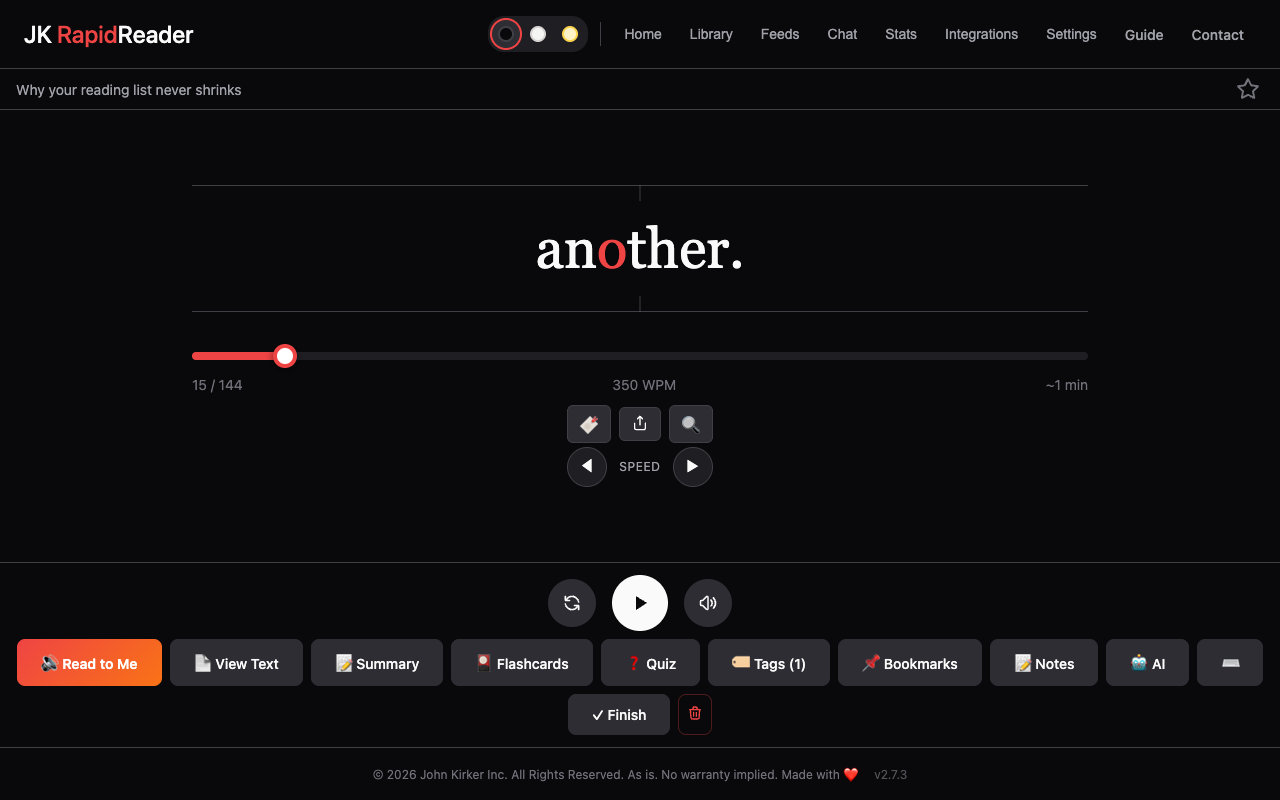
When you read a page your eyes jump from word to word, several times a second, and sometimes jump back. RapidReader brings each word to the same spot instead.
- The focus letter: words are recognised fastest when the eye lands a little left of their middle. That letter is red and stays on the centre line.
- Pauses at commas and full stops give each sentence time to land.
- Long words stay on screen a little longer.
- View Text is always one click away, for going back over a passage.
02 — Your library
Plain files, in a folder you choose.
When you save an article, RapidReader writes it to your folder as a Markdown file, with its notes, quizzes, flashcards and chat in files beside it. Your settings live there too.
Because it’s ordinary files, you can back it up, sync it with Dropbox or Google Drive, or open it in Obsidian, and RapidReader picks up your edits.
Browsers forget folder access when the last RapidReader tab closes, so after a restart you may click Reconnect once. How to make it stick.
03 — The AI
Your key, straight to the provider.
AI is optional. When you use it, RapidReader sends the text you chose directly from your browser to the provider you picked (Anthropic, OpenAI, Google or xAI) with your own key. Nothing passes through us, and you pay the provider only for what you use. The cost is shown before you send.
With Ollama, the model runs on your own computer and nothing leaves it.
For a long book, RapidReader splits it into passages and sends only the ones most relevant to your question, then shows you which. That keeps answers grounded and costs low.
04 — Permissions
It asks before reading the web.
At install, RapidReader asks only for the right-click menu, the tab you are using when you choose one of its actions, and storage.
Permission to fetch web pages is asked for the first time you need it: importing an address, opening a link, or adding a feed. It is used only to fetch what you ask for. More about this permission.